
Connect your AI agent to the Billy MCP
Connect Claude or ChatGPT to Billy in under 5 minutes to create events, find orders or analyze your sales just by writing what you want to do.
Run your Billy ticketing straight from Claude or ChatGPT. Create an event, find an order, generate a promo code… just by writing it. Connecting takes less than 5 minutes and you only do it once.
Before you start
You'll need two things:
- Your usual Billy login (email + password).
- The Billy server address below. Copy it, you'll paste it in the next step:
https://mcp.billyapp.live/mcpUsing Claude? Go to part 1. Using ChatGPT? Skip straight to part 2.
1. Connect Billy to Claude
These steps work on claude.ai (browser) and in the Claude app for Mac or Windows. Once Billy is added, it's available everywhere.
Open connectors
In Claude, click Customize, then Connectors.
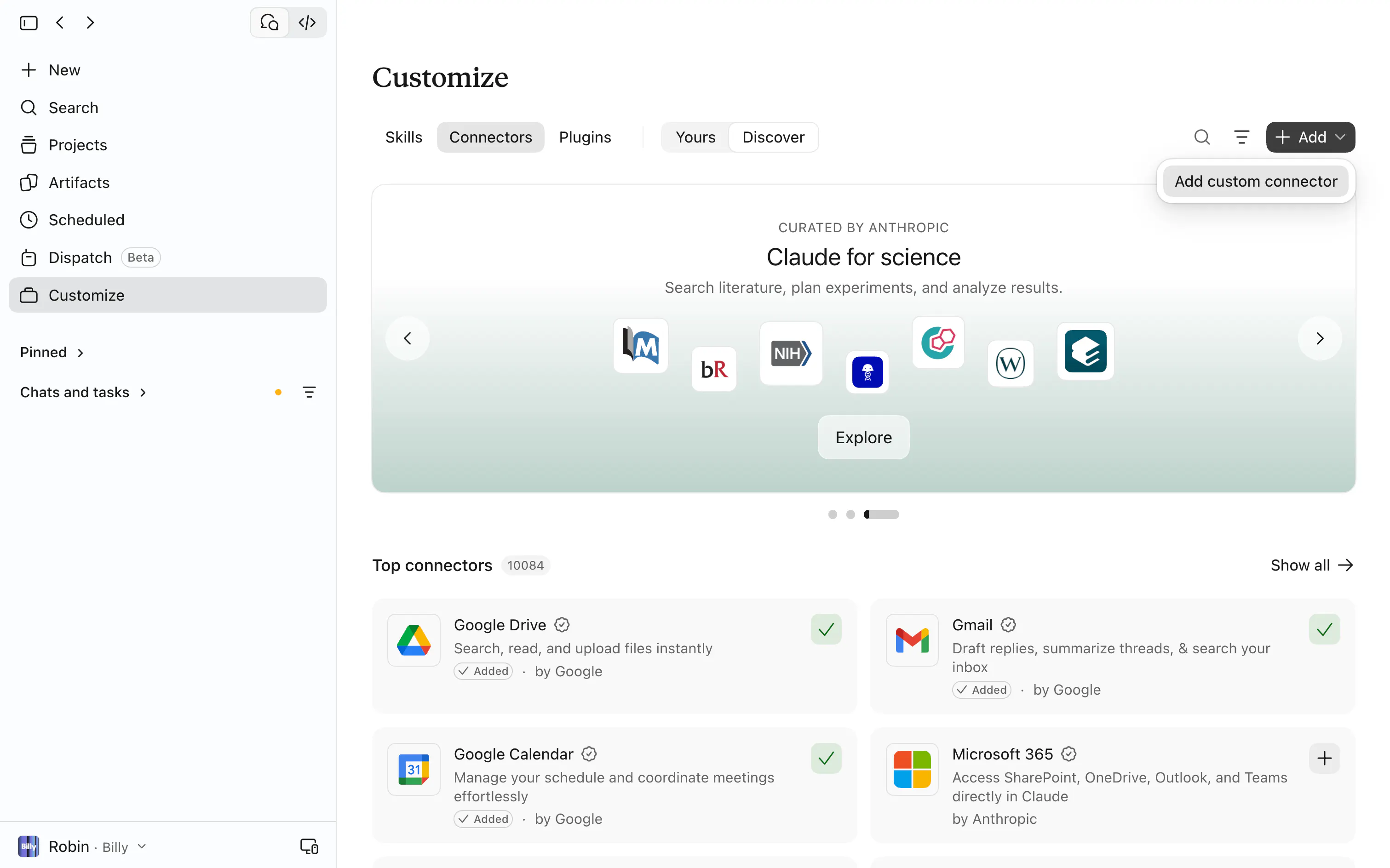

Add a connector
Click the Add custom connector button.
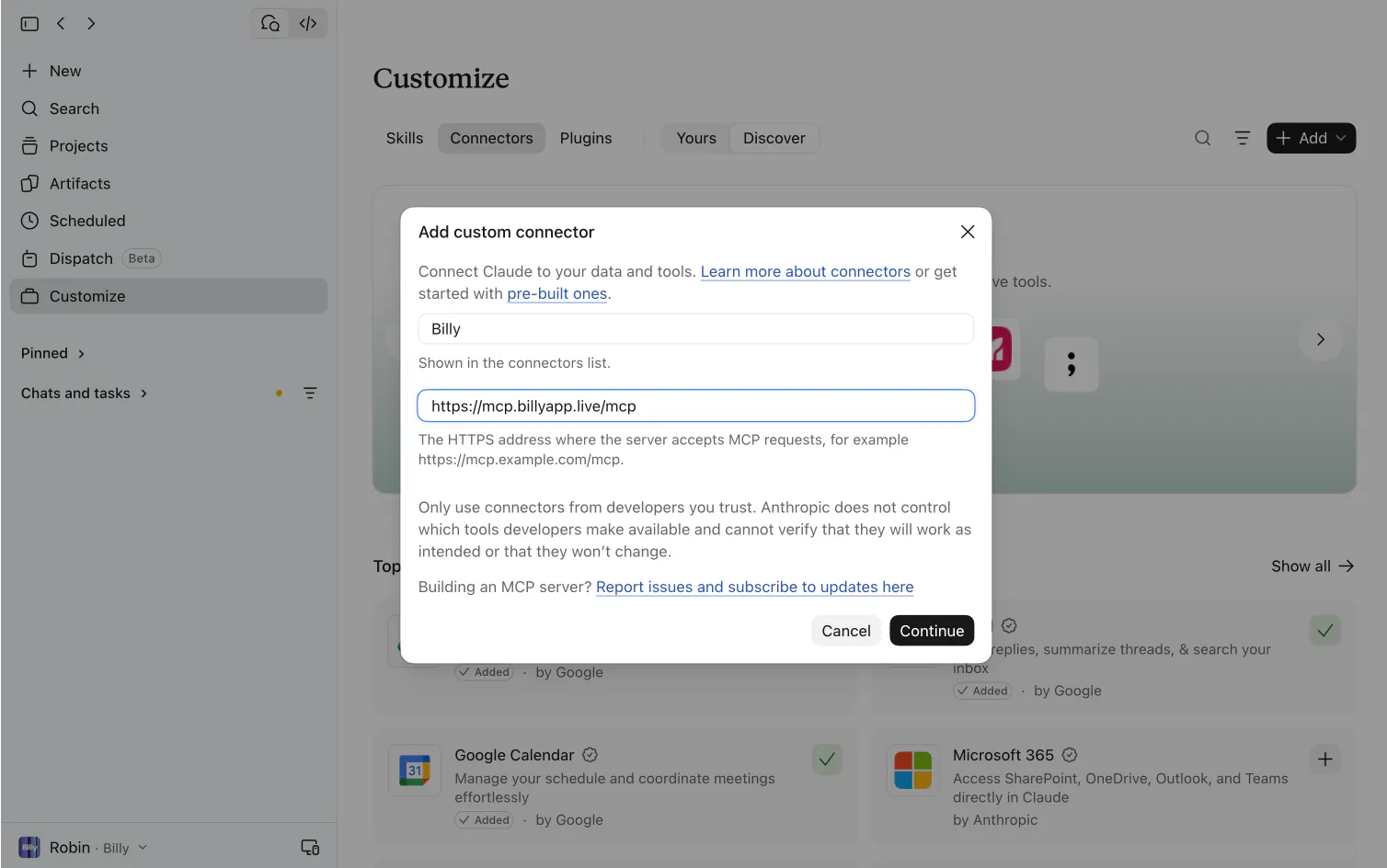
Fill in both fields
Name: Billy
URL: paste https://mcp.billyapp.live/mcp
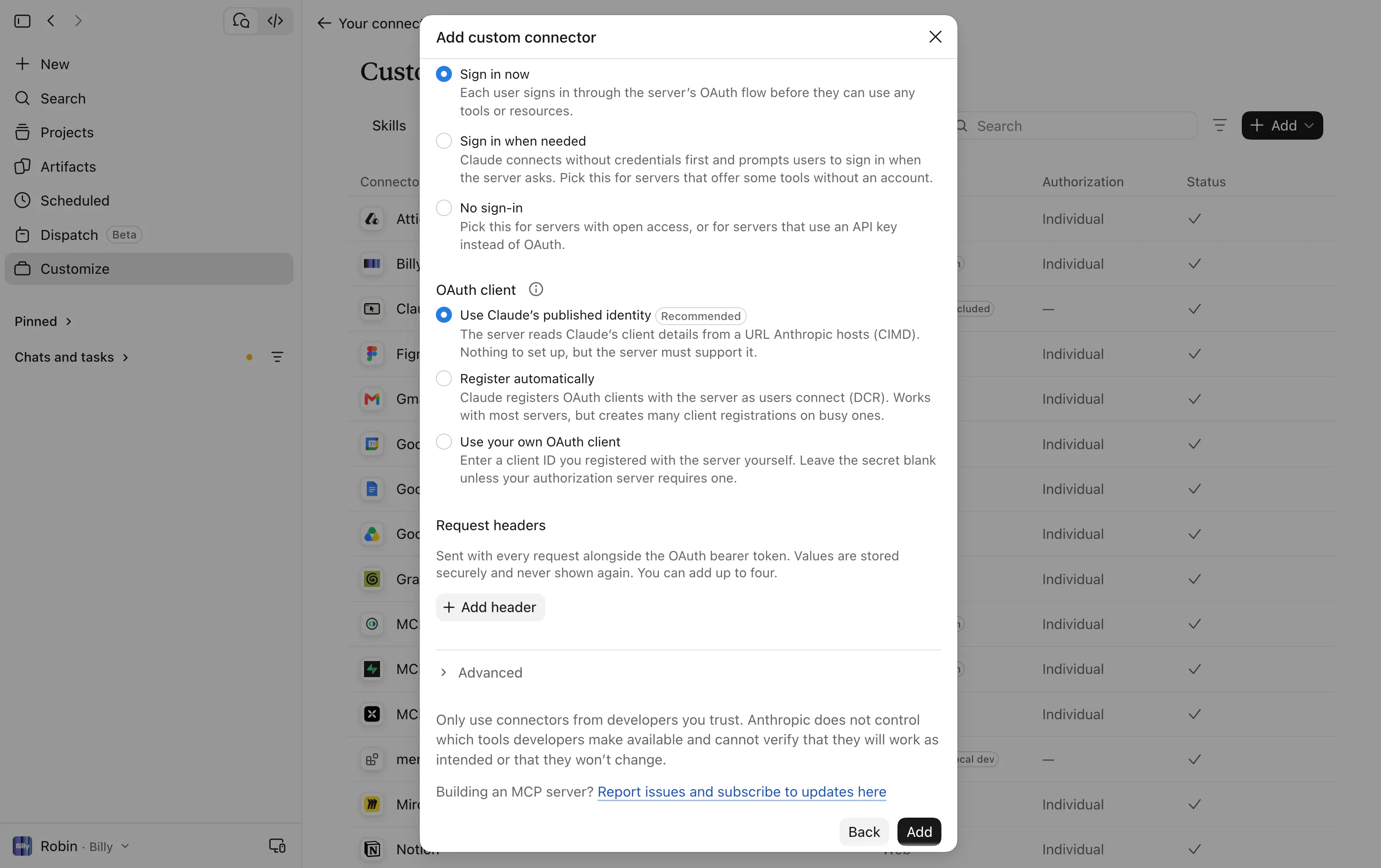
Don't change anything else (leave the advanced settings as they are).

Confirm
Click Add.

Connect your Billy account
Click Connect next to Billy. A Billy page opens: log in with your usual Billy credentials, then click Authorize.
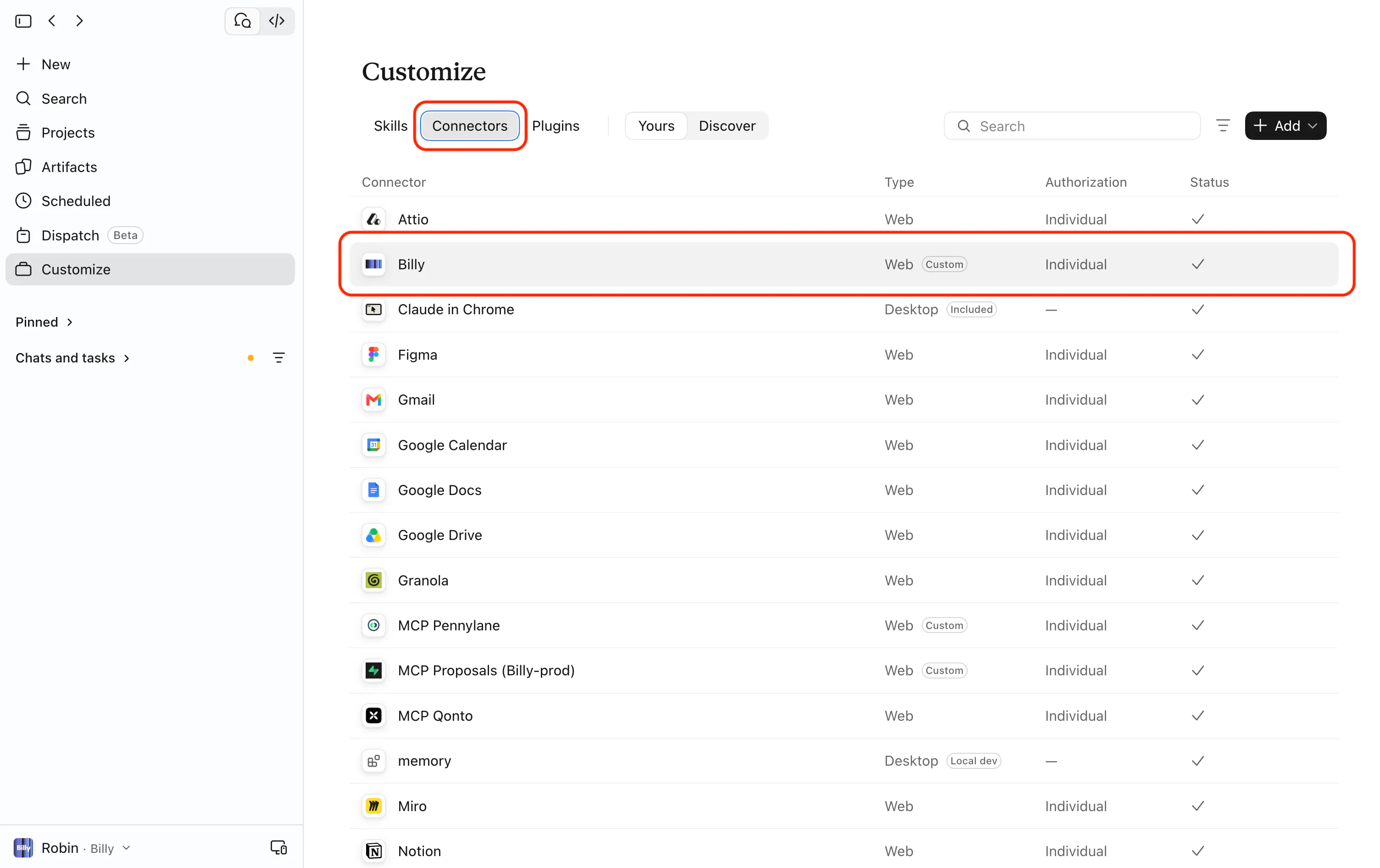
Check
Back in Claude, Billy shows as connected in the list of connectors. ✅

Turn Billy on in your conversation
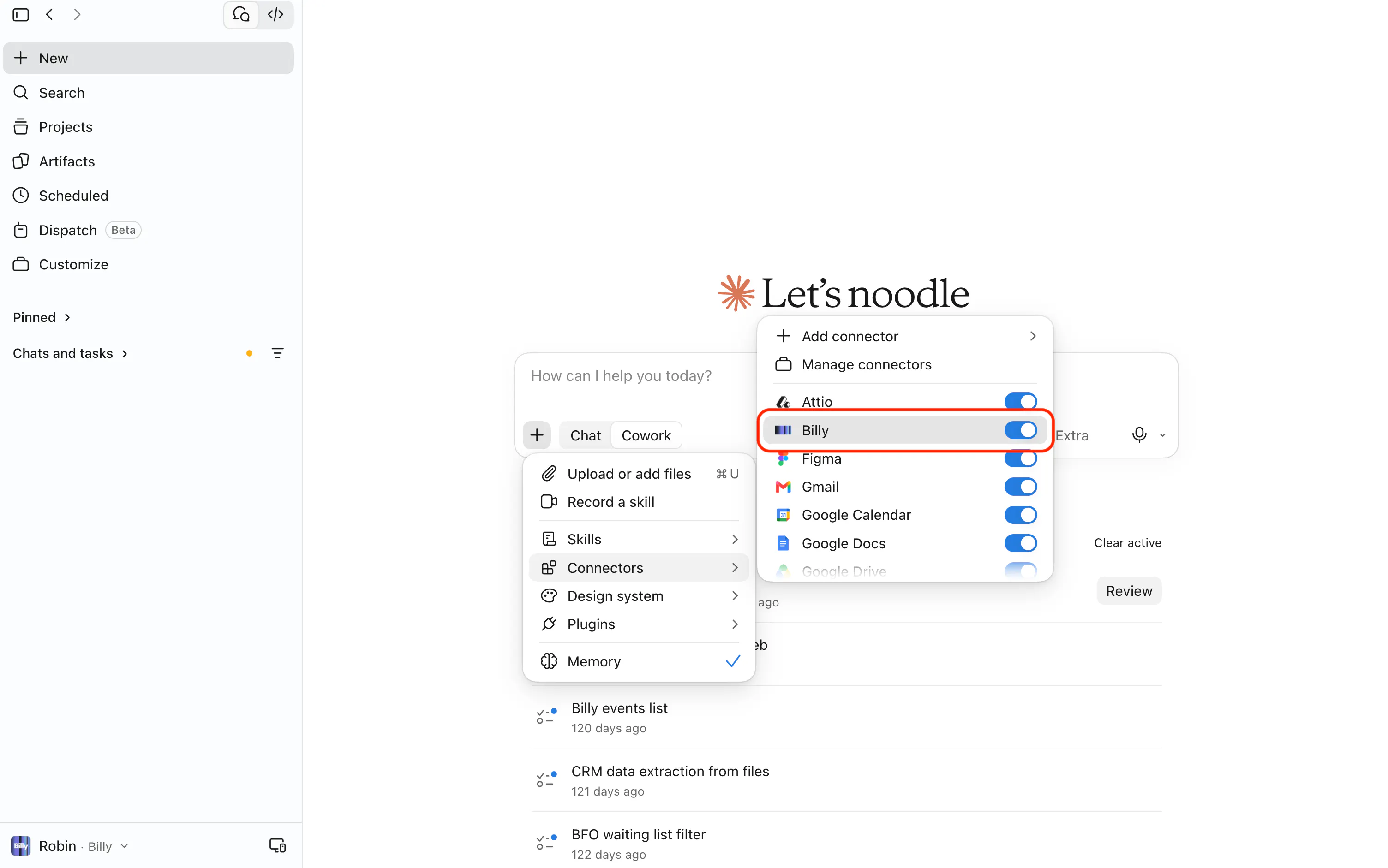
Open a new conversation, click the + button at the bottom of the input box, then Connectors, and check that the Billy toggle is on.

Test
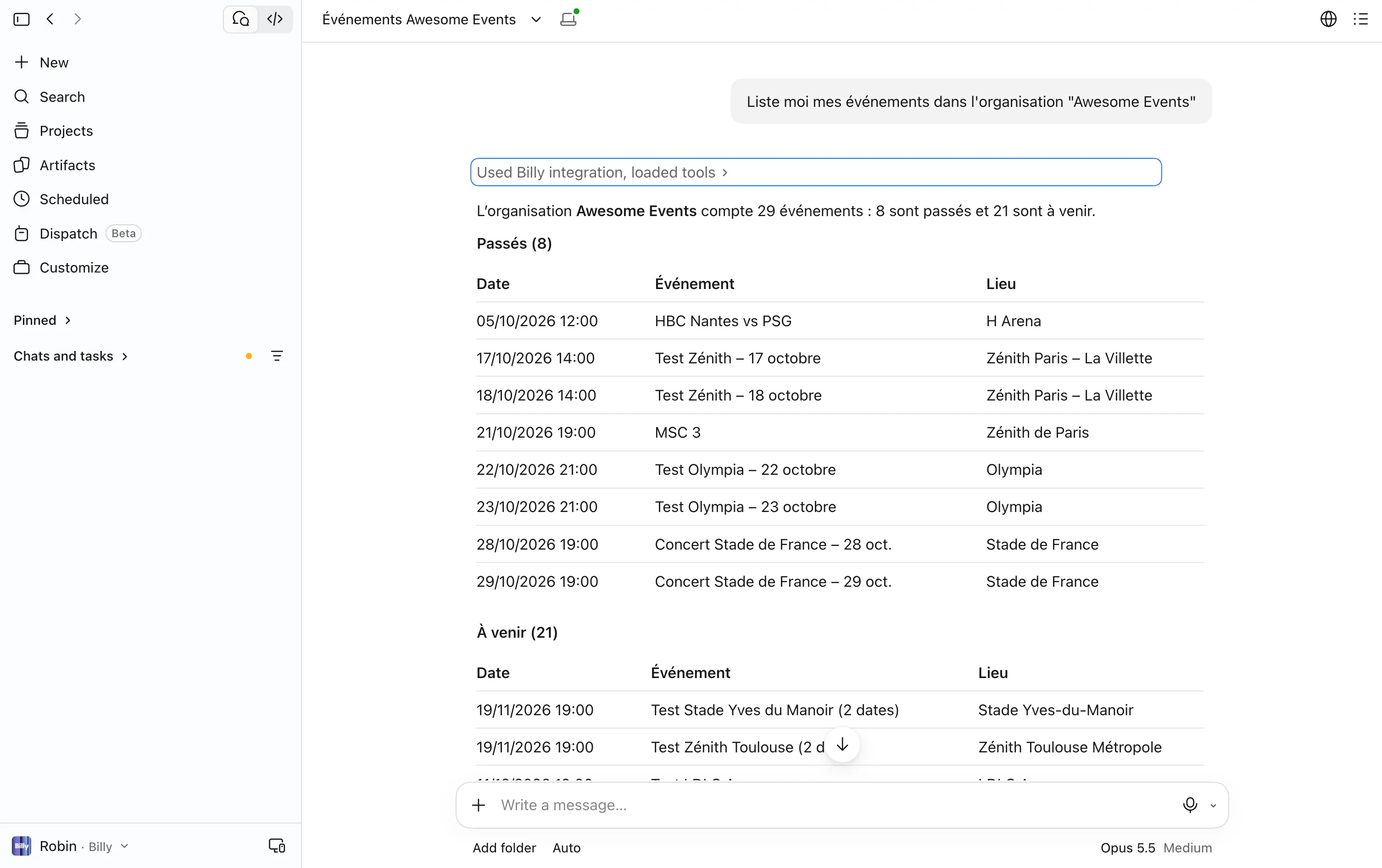
Write: "List my events in the "Awesome Events" organization". If Claude shows your events, you're all set 🎉

Using Claude as a team (Team or Enterprise plan)?
An owner of the Claude organization must first add the connector once:
- Organization settings → Connectors → Add → Custom.
- Name
Billy, URLhttps://mcp.billyapp.live/mcp, then Add.
Then each member goes to Customize → Connectors, finds Billy and clicks Connect (step 5 above).
2. Connect Billy to ChatGPT
These steps work on chatgpt.com (browser) and in the ChatGPT app for Mac or Windows.
Open plugins
In ChatGPT, go to Plugins (or open chatgpt.com/plugins directly).
Add a server
Click the + button at the top right, then Add custom MCP server.
Don't see this option? Go to Settings → Security and login, turn on Developer mode, then come back to the Plugins page.
Fill in the form
- Name:
Billy - Description:
My Billy ticketing - MCP server URL: paste
https://mcp.billyapp.live/mcp - Authentication: choose OAuth
Confirm
ChatGPT shows a standard warning message: tick I understand and want to continue.
Create
Click Create.
Connect your Billy account
A Billy page opens: log in with your usual Billy credentials, then click Authorize.
Check
Back in ChatGPT, Billy shows in your plugins with its list of actions. ✅
Use Billy in a conversation
Open a new conversation, type @ in the input box, then select Billy.
Test
Write: "Show me my Billy events". If ChatGPT shows your events, you're all set 🎉
Using ChatGPT at work (Business or Enterprise plan)?
In a ChatGPT workspace, an admin usually has to create the Billy server and publish it for the team. Send them this page: they follow steps 1 to 5, then each member does step 6.
ChatGPT's interface changes often. If a label looks slightly different for you, look for the closest match: the principle stays the same (name, URL, OAuth, Billy login).
3. What AI can do with Billy
Once connected, your AI has 37 capabilities: 16 to look up your data (👀 Read) and 21 to act on your account (✏️ Write). No need to know their names: just ask in plain words for what you want to do.
How do confirmations work?
- 👀 Read: the AI looks up your data. Nothing is changed and no confirmation is asked.
- ✏️ Write: the AI always works in two steps. It first shows you a summary of what it will do (or a before / after for a change). Nothing happens until you answer "Yes".
- A grouped request (for example 6 pricings at once) = a single confirmation.
🏢 Organizations
| 👀 Read | ✏️ Write |
|---|---|
| List the Billy organizations you have access to | |
| See your organization's forms and email templates |
📅 Events & sessions
| 👀 Read | ✏️ Write |
|---|---|
| List your events or find an event by name | Create an event (name, venue, up to 5 sessions), with or without a draft sales channel |
| See an event's details: description, venue, visuals, sessions, Studio link | Edit an event: name, description, venue, address, visuals, email logo and banner, tags |
| Add sessions to an event and put tickets on sale for them | |
| Move sessions that have no tickets sold yet |
🎟️ Tickets, packs & options
| 👀 Read | ✏️ Write |
|---|---|
| See everything an event sells: pricings, products, packs, options, prices and capacity | Create ticket categories (name, price incl. VAT, VAT rate, capacity) |
| Edit tickets, packs or options: name, description, images, quantities per order, options offered | |
| Create a pack (e.g. 2 adults + 2 children) | |
| Create options to add to the ticket (cloakroom, parking, meal…) |
🎨 Ticket design
| 👀 Read | ✏️ Write |
|---|---|
| See an event's ticket designs (PDF and Wallet) and the pricings using them | Create or edit a ticket design: banner, colors, partner logos, texts, Apple / Google Wallet pass |
| Download a proof (sample PDF ticket) for each pricing |
🛒 Online sales channels
| 👀 Read | ✏️ Write |
|---|---|
| List an event's sales channels (draft or published, opening dates) | Create a new sales channel (as a draft) |
| See a sales channel's full setup and its public link | Edit its settings: title, opening dates, sessions sold, Wallet, checkboxes, buyer form |
| Customize its look: colors, font, logo, cover image, trust badges | |
| Copy a sales channel's look to other sales channels | |
| Choose the offers sold, their order, their groups and the upsell offer | |
| Set purchase rules (e.g. 4 tickets max, 1 order per person, business email required) | |
| Publish a sales channel to open sales | |
| Apply an order confirmation email template |
🏷️ Promo codes
| 👀 Read | ✏️ Write |
|---|---|
| List promo codes and see how many times they were used | Create percentage promo codes |
👥 Guests
| 👀 Read | ✏️ Write |
|---|---|
| See the guest list and each guest's status | Add guests with a free ticket, with or without an invitation email |
📦 Orders
| 👀 Read | ✏️ Write |
|---|---|
| Find an order from an email, an order number or a ticket number (payment, tickets, scans, refunds) |
📊 Sales & analytics
| 👀 Read | ✏️ Write |
|---|---|
| Analyze your sales: revenue, tickets sold, orders per day, per event or per pricing, CSV export | |
| Explain the sales data available and what each metric measures |
💶 Finance
| 👀 Read | ✏️ Write |
|---|---|
| Download generated account statements (PDF) and their key figures | Generate an account statement over a period or a selection of events |
🖼️ Visuals
| 👀 Read | ✏️ Write |
|---|---|
| See the images you've uploaded | Get a link to upload new images to Billy |
🧩 What stays in Billy Studio
Some operations can only be done in Billy Studio (the AI can give you the event's Studio link):
- Disabling or editing an existing promo code
- Changing the price, stock or VAT of an existing pricing, and the content or prices of a pack
- Moving a session that already has tickets sold, or changing an event's time zone
- Events with assigned seating (seat map)
- A sales channel's access codes and its description
- Creating or editing forms and email templates
- Payment settings
4. Prompts to get started
Copy a request, replace what's in square brackets, and send it. Each capability has two examples.
Tips for writing your requests
- Name the event, and the organization if you manage several.
- To create tickets, always give the price incl. VAT, the VAT rate and the capacity per session.
- Give times in the venue's local time (e.g. "8pm" for a concert in Paris).
- Group them: "create these 4 pricings" in one request means a single confirmation.
- Read the summary before answering "Yes": some actions (publishing a sales channel, creating a session or a promo code) can't be deleted afterwards.
🏢 Organizations
👀 List your organizations
List my Billy organizations.I manage several companies: which Billy organizations do I have access to?👀 See forms and email templates
Which forms exist in my [organization name] organization?List the confirmation email templates available in [organization name].📅 Events & sessions
👀 List your events
Show me my upcoming events in the [organization name] organization.Find the event with "[word in the title]" in its name.👀 See an event
Give me the details of [event name]: venue, address and all its sessions.Which sessions of [event name] already have tickets? Also give me the event's Studio link.✏️ Create an event
Create an event "[Event name]" on [December 12, 2026] from [8pm] to [11pm] at [venue name], [full address], with a draft sales channel.Create "[Show name]" on 3 sessions: [date 1], [date 2] and [date 3], from [8pm] to [10:30pm], at [venue name], with no sales channel for now.✏️ Edit an event
Update the description of [event name] with this text: [your text].The venue of [event name] is changing: it's now [new venue], [new address].✏️ Add sessions
Add a session to [event name] on [Saturday, December 20] from [4pm] to [6pm], with [100] places in [Full price] and [50] in [Reduced price].Add every Friday and Saturday of [January 2027] to [event name], from [8:30pm] to [10pm], with no tickets on sale for now.✏️ Move sessions
Move the [February 14] session of [event name] to [9pm] instead of [8pm].Move the [March 3] session of [event name] to [March 10], same times.🎟️ Tickets, packs & options
👀 See what an event sells
Which pricings are offered for [event name], at what price and with how many places?List the options and packs of [event name].✏️ Create pricings
Create 3 pricings for [event name]: Full [€35], Reduced [€25], Child [€15], VAT [5.5%], [200] places each.Add an "[Early Bird]" pricing at [€29] incl. VAT, VAT [5.5%], limited to [100] places, on [event name].✏️ Edit tickets, packs or options
Rename the "[Reduced]" pricing of [event name] to "[Student price]" and add the description: "[Proof required at the door]".Limit the [Full] pricing of [event name] to [6] tickets max per order.✏️ Create a pack
Create a "Family Pack" on [event name]: 2 [Adult] tickets at [€25] and 2 [Child] tickets at [€12], 1 pack max per order.Create a "[Duo]" pack on [event name]: 2 [Full] tickets at [€30] each, on sale until [January 15].✏️ Create options
Create a "Parking" option at [€10], VAT [20%], [80] places per session, 1 max per order, and offer it with the [Full] pricing of [event name].Add two options to [event name]: Cloakroom [€2] and Meal [€18], VAT [10%], [300] per session, up to [4] per order.🎨 Ticket design
👀 See ticket designs
Which ticket designs exist for [event name] and which pricings use them?Show me the colors and texts of the ticket design of [event name].👀 Download a proof
Send me the proof of all tickets for [event name].Generate a sample ticket for the [VIP] pricing of [event name] so I can check how it looks.✏️ Create or edit a design
Create a ticket design "[Design name]" for [event name]: background [#0B1F3A], text [white], with the legal notice: "[your text]". Apply it to the [Full] pricing.Switch the ticket design of [event name] to badge format, so it can be printed and worn.🛒 Online sales channels
👀 List sales channels
Where are tickets for [event name] on sale?List the sales channels of [event name] and tell me which ones are still drafts.👀 See a sales channel's setup
Give me the public link of the sales channel for [event name].Show me the full setup of the [sales channel name] sales channel: opening dates, offers and purchase rules.✏️ Create a sales channel
Create a "[Partners]" sales channel for [event name], open from [December 1 at 10am] to [December 15 at 11:59pm].Create a "[Works councils]" sales channel on [event name], open from now until the day before the event.✏️ Edit a sales channel's settings
Extend the sales channel of [event name] until [December 20 at 6pm].On the [sales channel name] sales channel, show sessions as a calendar and turn on adding tickets to Apple Wallet and Google Wallet.✏️ Customize the look
Switch the sales channel of [event name] to a dark theme, with [#FF5A1F] buttons and the [Bebas Neue] font.Show the "Official ticketing" and "Apple & Google Pay" badges on the sales channel of [event name], with rounded corners.✏️ Copy the look to other sales channels
Copy the look of the [event 2026] sales channel to all sales channels of [event 2027].Apply the look of the [sales channel name] sales channel to all sales channels of my [season or festival name] events.✏️ Choose the offers sold and their order
On the sales channel of [event name], show the pricings in this order: [Full], [Reduced], [Child], and remove the [Early Bird] pricing.On the [sales channel name] sales channel, group the VIP pricings into a "[VIP Experiences]" group and offer the [Family Pack] as an upsell.✏️ Set purchase rules
Limit orders to [4] tickets max on the sales channel of [event name].On the [Partners] sales channel, only allow emails ending in [@company.com], with one order per person.✏️ Publish a sales channel
Publish the sales channel of [event name] and give me the link to share.Check that the [sales channel name] sales channel is ready to sell (pricings, places, sessions), then publish it.✏️ Apply a confirmation email template
Apply the "[template name]" email template to all sales channels of [event name].Put the default Billy confirmation email back on the [sales channel name] sales channel.🏷️ Promo codes
👀 List promo codes
Which promo codes exist on [event name] and how many times were they used?Can the [XMAS20] code of [event name] still be used today?✏️ Create promo codes
Create a [EARLY20] promo code for -20% on [event name], valid until [November 30 at 11:59pm].Create [10] unique -100% codes on the [Full] pricing of [event name], each usable only once.👥 Guests
👀 See the guest list
Who is on the guest list of [event name] and who hasn't answered yet?Is [firstname.lastname@email.com] already invited to [event name]?✏️ Add guests
Add these guests to [event name] on [date], pricing [Invitation], and email them their ticket in English: [list of first name, last name, email].Here is my CSV file of guests: add them to the [date] session of [event name], without sending them an email.📦 Orders
👀 Find an order
Find the orders of [john.smith@email.com] and tell me if their tickets were scanned.What happened to order [ABCDEFGH]? Was it paid or refunded?📊 Sales & analytics
👀 Analyze your sales
How many tickets did I sell and what revenue for [event name], pricing by pricing?Give me the daily sales of [event name] over the last 30 days, then export all its orders as CSV.👀 Understand the available data
What sales data can you analyze for me?What exactly does "revenue" include in your Billy sales analyses?💶 Finance
✏️ Generate an account statement
Generate the account statement of [event name] for the whole period.Generate an account statement for the [organization name] organization for [October 2026], all events included.👀 Download an account statement
Is the account statement ready? Give me the download link.Download the statements you just generated and sum up their key figures.🖼️ Visuals
✏️ Upload new images
I want to change the poster of [event name]: give me a link to upload the new image.Give me a link to upload the logo and banner of the sales channel for [event name].👀 See uploaded images
I've dropped my images: which ones did you receive?Of the images I just uploaded, use the widest one as the cover image of the sales channel for [event name].🧭 Guided journeys
Chains of requests for the most common situations. Send them one by one, in the same conversation.
🚀 Launch an event from A to Z
Step 1: Create the event
Create the event "[Event name]" on [date] from [8pm] to [11pm] at [venue name], [full address], with a draft sales channel.Step 2: Create the pricings
Create the pricings of [Event name]: Full [€35] and Reduced [€25], VAT [5.5%], [300] places each.Step 3: Put the pricings on sale
Put these pricings on the sales channel of [Event name], Full first then Reduced, and limit orders to [6] tickets.Step 4: Upload your visuals
Give me a link to upload my logo and the poster of [Event name].Step 5: Dress up the sales channel
I've dropped the images: put the logo and the poster on the sales channel of [Event name], with colors that match the poster.Step 6: Check the tickets
Send me the proof of the tickets for [Event name].Step 7: Open sales
All good: publish the sales channel of [Event name] and give me the link to share.📈 Track sales (weekly check-in)
Step 1: Today's figures
How many tickets sold and what revenue for [Event name] since sales opened, pricing by pricing?Step 2: The trend
Show me the weekly sales of [Event name] since opening, to see if they're picking up.Step 3: The effect of promo codes
Which promo codes were used on [Event name] and how many tickets did they discount?Step 4: The channels that sell
Which sales channel sells the most for [Event name]? Give me the revenue and number of orders of each.Step 5: This week's export
Export as CSV all orders of [Event name] from the last 7 days.🏁 Wrap up
Step 1: The key figures
Give me the final results of [Event name]: tickets sold, revenue, number of orders and average basket.Step 2: The breakdown
Break down the sales of [Event name] by pricing and by session.Step 3: The guests
How many guests of [Event name] had confirmed, and how many didn't answer?Step 4: The full export
Export as CSV all orders of [Event name].Step 5: The account statement
Generate the account statement of [Event name] for the whole period and send me the PDF.5. Security
- The AI only sees the organizations and data your Billy account already has access to.
- Before any action on your account (creating, editing), Claude and ChatGPT ask for your approval: read before you confirm.
- You can disconnect Billy at any time from the Connectors page (Claude) or Plugins page (ChatGPT).
Need help?
Write to us at hello@billyapp.live: the Billy team will get back to you quickly.